Master Your Instagram Grid with Puzzle Feed Templates in Canva
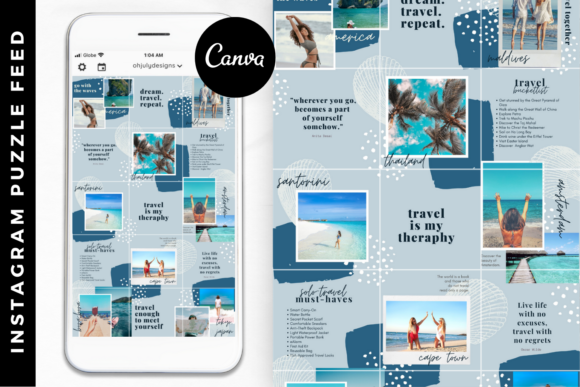
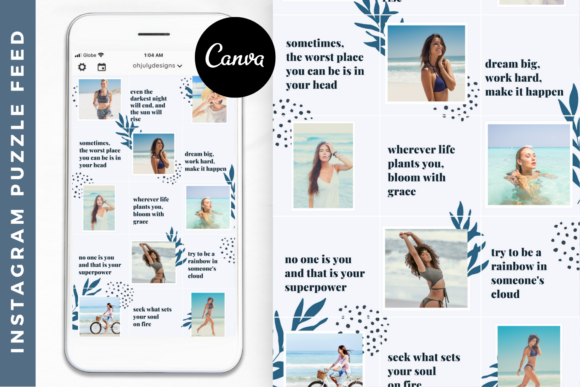
Maintaining a visually cohesive Instagram feed can feel like a full-time job. You spend hours curating content, only to find that your grid looks disjointed when someone views your profile. This is where Instagram Puzzle Feed Templates Canva comes into play. It solves the aesthetic puzzle—literally—by allowing you to design nine, twelve, or even fifteen posts as a single, unified canvas. When you upload them sequentially, they tile together perfectly to create one large, panoramic image on your profile grid. It is a strategic move for anyone serious about their visual branding, turning a chaotic feed into a curated gallery that stops the scroll.
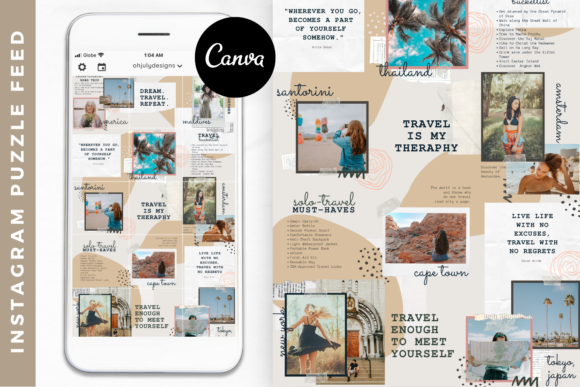
Take the Isabelle Instagram Template as a prime example. This specific design leans into a feminine, modern aesthetic that appeals to bloggers, influencers, and creative entrepreneurs. However, the real value lies in the mechanics of the puzzle structure. By using a 15-grid Instagram Puzzle Feed Template in Canva, you are not just decorating; you are planning content architecture. You can map out a week or a month of content in a single design session. This approach ensures that every post relates to the next, guiding the viewer’s eye across your profile in a way that feels intentional and professional. It transforms your feed from a collection of random snapshots into a cohesive brand narrative.
The Anatomy of a Puzzle Feed: Design and Functionality
At its core, an Instagram Puzzle Feed Template is a master file sliced into a grid. In the context of the Isabelle template, the design utilizes clean lines, ample white space, and balanced typography to create visual breathing room. The personality of this style is professional yet approachable. It avoids clutter, which is essential for modern typography and editorial design. When you load a template like this into Canva, you are working with a premium font selection and a curated color palette that has already been tested for digital readability.
The strength of this system lies in its flexibility within a structured framework. You can change the background colors, swap out photography, and adjust the font pairing to match your specific brand identity. For instance, if the default sans serif font feels too stark, you can swap it for a serif font to add a touch of traditional elegance, or a script font for a more personal, handwritten feel. The goal is not to use the template as a rigid cage, but as a scaffold for your own brand identity. This ensures that while the structure is shared, the execution is uniquely yours, preventing your feed from looking like a carbon copy of other users.
Strategic Application: Where Function Meets Aesthetics
While the Isabelle template is designed for the digital realm of Instagram, the principles of its layout apply across various creative projects. The grid structure is fundamental to web design and packaging design. When you master the flow of images and text within a puzzle feed, you are essentially practicing advanced visual hierarchy. You learn how to balance heavy imagery with negative space, a skill that translates directly to logo design and social media graphics beyond just Instagram.
Consider the impact on audience engagement. A cohesive grid acts as a visual hook. When a potential follower lands on your profile, they make a split-second decision based on your aesthetic. A messy feed can suggest a lack of organization, whereas a unified puzzle feed signals professionalism and attention to detail. This is particularly vital for small business owners and digital creators. By utilizing Instagram Puzzle Feed Templates Canva, you are leveraging design assets that do the heavy lifting for you. You are effectively using a display font strategy—where your entire grid becomes a display of your brand's personality.
Practical Workflow: Speed, Efficiency, and Consistency
One of the most significant hurdles for content creators is the "blank page syndrome." Staring at an empty canvas trying to decide where to place a text box or an image can waste valuable time. A 15-grid Instagram Puzzle Feed Template in Canva eliminates this friction. Because the layout is pre-designed, you are simply filling in the blanks with your content. This is not about cutting corners; it is about working smarter. You can batch your content creation, designing a full month of posts in one sitting, which frees you up to focus on writing blogs, creating products, or building your empire.
Furthermore, the usability of Canva makes this accessible to everyone, regardless of technical skill. You do not need to be a professional graphic designer to achieve professional results. The drag-and-drop interface allows you to manipulate creative fonts and images effortlessly. However, it is worth noting the importance of readability. When using display fonts or intricate script fonts, ensure that the text remains legible against your chosen backgrounds. High contrast is key. If you are using a handwritten font, keep the text size larger to ensure mobile users can read it without squinting.
Elevating Your Brand Narrative
Ultimately, using a template like the Isabelle puzzle feed is about storytelling. It allows you to break a single image or message across multiple tiles, creating a sense of curiosity and encouraging users to pause on your content. This technique is excellent for announcements, product launches, or educational carousels. It forces the viewer to look at the bigger picture—literally. By maintaining a consistent color scheme and typography style across all 15 squares, you reinforce your brand identity with every post. It is a powerful tool for anyone looking to step up their game in the algorithm and present a polished, modern, and unique digital storefront.